What is a color space?
A color space maps all the colors a specific output device can reproduce – structured as a three-dimensional model within the larger visible spectrum. In short: it defines what a device can actually show or print.
Definition Color Space
Every output device – whether a monitor, printer, camera, or scanner – can only reproduce a subset of all colors visible to the human eye. A color space defines exactly that subset: the range of colors available within a given device or workflow.
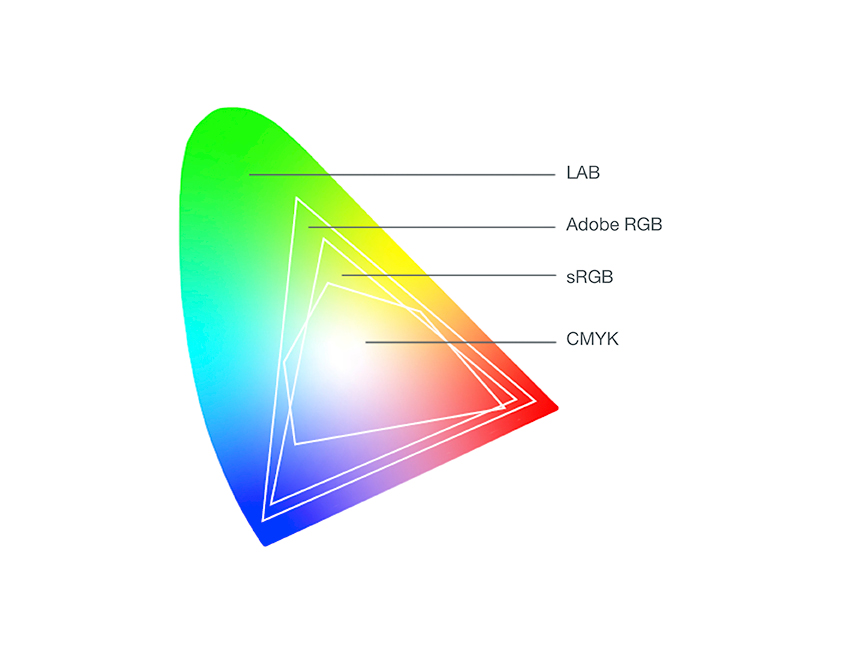
The reference point for all color spaces is the LAB color space, which encompasses the full range of human-visible color. Since no device can reproduce this entire range, individual color spaces – such as sRGB, Adobe RGB, or CMYK – are defined to match the capabilities of specific devices and use cases.
Key takeaway: The larger the color space, the more color nuances a device can reproduce – but also the greater the risk of color loss when converting between color spaces.
Why Color Spaces Matter in Product Communication
Choosing the right color space is not a technical detail — it directly affects how your products look across every channel.
- Consistency across channels: A product photographed in one color space may look different on a website, in a printed catalogue, or on a marketplace — unless color spaces are managed correctly throughout the workflow.
- Conversion losses: Converting an image from a smaller color space (e.g. sRGB) to a larger one (e.g. Adobe RGB) can result in color shifts or loss of nuance — and vice versa.
- Media-neutral workflows: Working in a universally applicable color space (e.g. ECI-RGB) allows the same image assets to be used reliably across both digital and print productions.
Color Spaces in Prepress & Print Workflows
In prepress, the concept of a working color space is particularly important. A working color space is the color space used by image editing software — such as Adobe Photoshop — during the editing process.
Best practice: the working color space should be as close as possible to the intended output color space. At the same time, for workflows where images are reused across multiple channels, a broader, media-neutral color space is recommended. Working in ECI-RGB, for example, allows images to be reliably repurposed for both online and print use without significant color loss.
FAQ about Color Spaces
What is the difference between a color space and a color model?
A color model (e.g. RGB or CMYK) describes the principle by which colors are mixed. A color space is a specific, defined implementation of that model – with fixed reference values for a particular device or standard (e.g. sRGB or Adobe RGB).
Which color space should I use for web and digital channels?
sRGB is the standard for web and screen use. It is supported by virtually all browsers and devices, making it the safest choice for digital product content.
Which color space is right for print production?
For print, CMYK is the standard output color space. For editing and media-neutral workflows, ECI-RGB or Adobe RGB are commonly used, as they cover a wider gamut and convert reliably to CMYK.
Need help with color spaces?
Do you need help choosing the right color space for your workflow – or keeping colors consistent across screen and print?
Related glossary entries
- LAB Color Space – the reference model encompassing all human-visible colors
- RGB – the additive color model used for screens and digital output
- CMYK – the subtractive color model used in print production
- Color Management – the process of ensuring consistent color across devices and channels