What is LAB color space (CIELAB)
The LAB color space (also called CIELAB) is a device-independent color model that describes color in a way that aligns closely with human vision. It’s widely used in image editing and print workflows to compare, adjust, and convert colors consistently across different devices.
If you work with color across channels – e-commerce, catalog, print, and social – you’ve probably seen that the “same” color can look different on different devices. LAB is helpful because it describes colors independently of specific devices (unlike RGB or CMYK), making it a reliable reference for precise color adjustments and conversions.
Definition: How LAB (CIELAB) works
LAB is based on the CIELAB system, introduced in 1976 by the CIE (Commission Internationale de l’Eclairage). In LAB, every color is described using three axes:
- L (Lightness): perceived brightness from 0 (black) to 100 (white)
- a: the green–red axis (-a = green, +a = red)
- b: the blue–yellow axis (-b = blue, +b = yellow)
Because these axes are designed around perception, LAB is often used as a “neutral” space for measuring and comparing color.
Why LAB is important
LAB is especially useful when you need accurate color correction and conversion:
- Device-independent reference: stable description of color even if device settings change
- Consistent editing: adjustments can be made in a way that better matches what humans perceive
- Cross-media workflows: supports reliable conversion between RGB and CMYK in color-managed processes
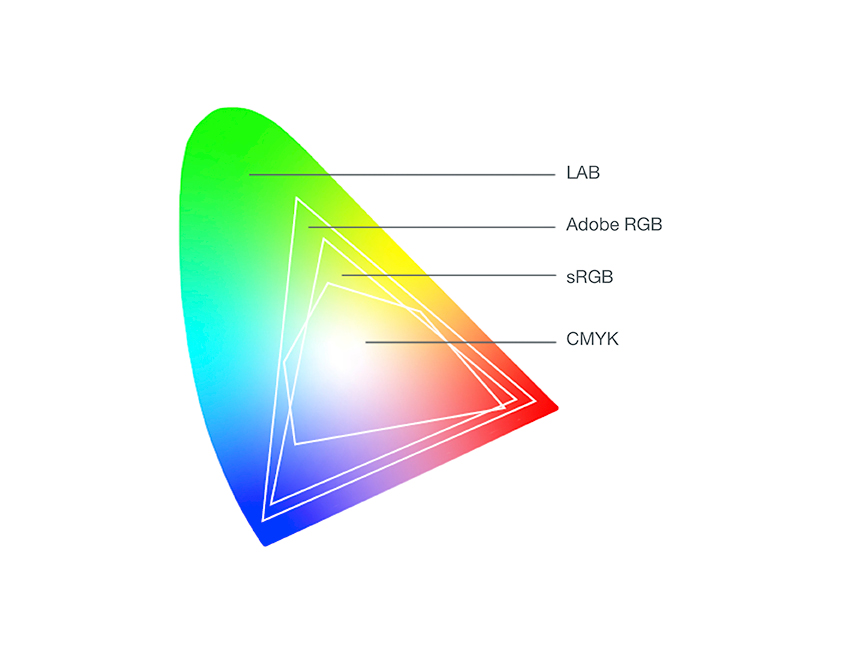
Compared to RGB or CMYK, which depend heavily on specific device and output conditions, LAB remains consistent as a device-independent model.
LAB vs. RGB vs. CMYK
- RGB: screen-based color (light). Great for digital channels.
- CMYK: print-based color (ink). Essential for production printing.
- LAB: perception-based reference space. Ideal for comparing, adjusting, and converting colors across devices.
Practical tip: Where you’ll encounter LAB
You’ll often see LAB used in:
- Image editing (e.g., retouching, precise color tweaks)
- Print production (color correction and color conversions)
- Quality assurance (evaluating whether colors match across outputs)
FAQ about LAB Color Space
Is LAB a device color space like sRGB?
No. LAB is device-independent – it’s designed to describe colors regardless of a specific screen, camera, or printer.
What do L, a, and b mean?
L is lightness (0–100). a runs from green to red. b runs from blue to yellow.
Why use LAB in image editing?
Because it supports very precise adjustments that map well to human perception and helps with consistent conversions.
Is LAB used in printing?
Yes – often as a reference for color correction and conversion in color-managed print workflows.
Can we support you?
Do you need help keeping colors consistent across channels – or setting up a color workflow that works reliably from screen to print?
Related glossary entries
- Color space – Defines gamut and how colors are represented.
- RGB – the additive color model used for screens and digital output
- CMYK – the subtractive color model used in print production.
- Color Management – the process of ensuring consistent color across devices and channels